Faster page loading and improved interaction responsiveness
Better Core Web Vitals and performance visibility
Reduced unnecessary JavaScript and resource consumption
More efficient rendering and scalable application architecture
Results depend on scope, integrations and adoption.
The operating context
A clearer view of the whole operation.
Next.js applications can experience performance bottlenecks as features, dependencies, API requests, and user traffic increase. PySquad helps businesses identify and resolve frontend, rendering, backend, and infrastructure issues through targeted Next.js performance optimization.
Where friction builds
Why Next.js Applications Become Slower as They Grow
A Next.js application may initially perform well but become slower as its functionality expands. Large JavaScript bundles, unnecessary client side rendering, inefficient React components, unoptimized images, and excessive API requests can increase page loading and interaction times. Poor caching and rendering decisions can also affect server response times and resource usage.
When performance issues are not investigated systematically, development teams often apply isolated fixes without identifying the underlying bottlenecks. Slow Largest Contentful Paint (LCP), high Interaction to Next Paint (INP), layout shifts, and delayed server responses can affect user experience, Core Web Vitals, and the ability to scale application workloads efficiently.
Current approach
Increase server resources when pages become slow
Install optimization plugins without performance audits
Reduce image sizes without profiling applications
Apply caching without reviewing rendering behavior
Image compression alone cannot improve every Core Web Vital
Unplanned caching can introduce stale or inconsistent data
Inside the solution
The capabilities behind the operation.
Review the functional scope, then discuss the requirements specific to your team.
Next.js Performance Audit
Analyze application architecture, rendering behavior, JavaScript execution, API requests, and asset delivery to identify performance bottlenecks. Review Lighthouse reports, Core Web Vitals, and real user measurements where available.
JavaScript and Bundle Optimization
Reduce unnecessary JavaScript delivery through code splitting, dynamic imports, dependency analysis, tree shaking, and component level optimization. Improve bundle efficiency and reduce the amount of code users need to download and execute.
Rendering and React Performance Optimization
Review server side rendering, static generation, incremental static regeneration, and client side rendering strategies. Optimize React components, reduce unnecessary re-renders, and improve rendering decisions based on application requirements.
API and Backend Performance Optimization
Identify slow API endpoints, inefficient database queries, unnecessary network requests, and backend bottlenecks. Improve response times through query optimization, request handling improvements, and appropriate caching strategies.
Image, Asset and Caching Optimization
Improve image delivery, static asset loading, font handling, and resource caching. Review Next.js image optimization, cache policies, CDN delivery, and resource loading priorities to reduce unnecessary network overhead.
Core Web Vitals Monitoring and Reporting
Measure LCP, INP, and CLS alongside application performance indicators. Compare baseline and post-optimization results, identify recurring bottlenecks, and provide technical recommendations for continued performance improvements.
Audit application architecture, loading behavior, and Core Web Vitals
02
Profile JavaScript execution, React rendering, and bundle dependencies
03
Identify API bottlenecks, database issues, and caching inefficiencies
04
Prioritize optimization tasks based on measured performance impact
05
Implement and validate frontend, backend, and asset improvements
06
Compare performance metrics and document optimization recommendations
Our approach
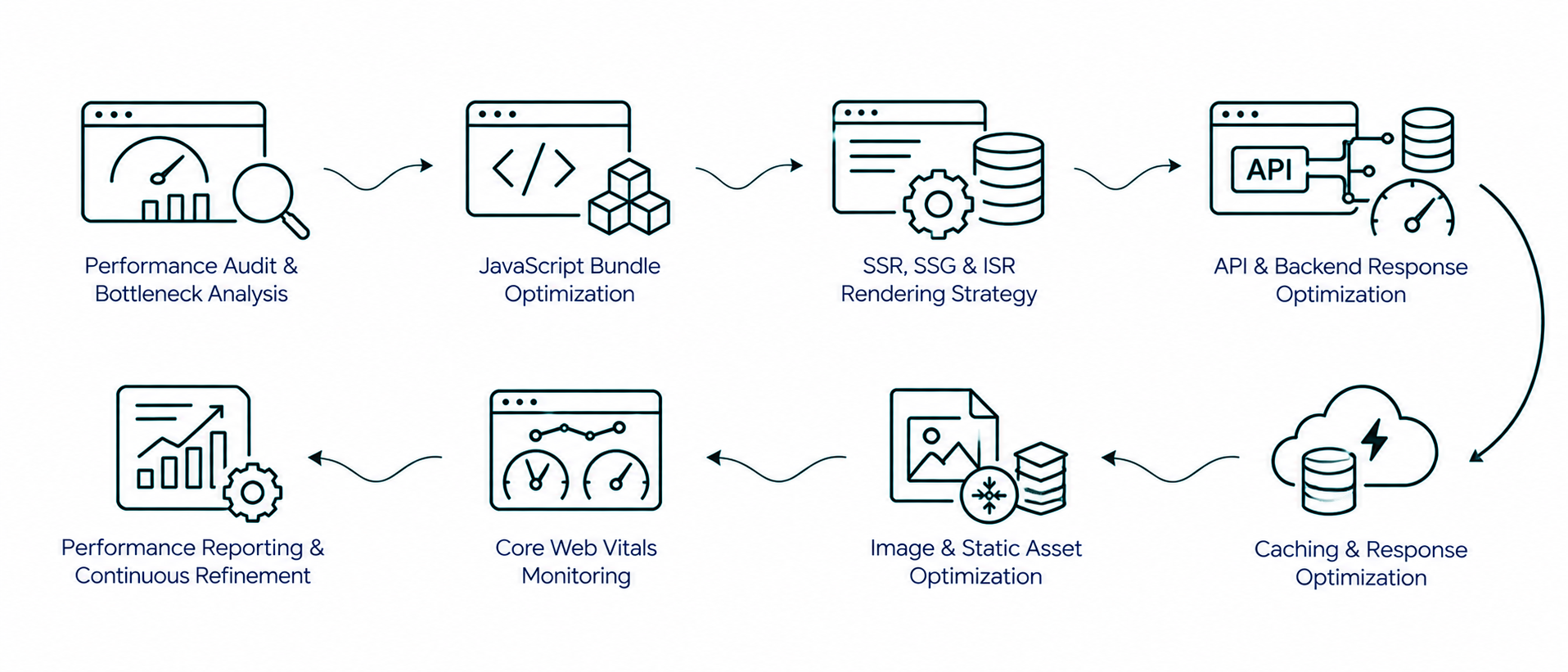
PySquad approaches Next.js performance optimization by investigating application architecture, rendering behavior, JavaScript execution, API response times, caching, and asset delivery. We prioritize improvements based on measured bottlenecks and validate changes using performance metrics and real application behavior.
How it connects
The complete workflow, in one view.
Make an informed decision
Is this the right fit?
The right solution starts with the right operating requirements.
How can I improve the performance of my Next.js application?
Improving Next.js performance starts with identifying bottlenecks in rendering, JavaScript execution, API responses, image delivery, and caching. A performance audit can reveal which areas need attention. Optimization may involve code splitting, dynamic imports, React component improvements, rendering strategy changes, API optimization, and better resource delivery.
Can you optimize an existing Next.js application without redesigning it?
Yes. Performance optimization can focus on the existing application architecture and codebase without requiring a complete UI redesign. PySquad can investigate frontend rendering, JavaScript bundles, API performance, caching, and asset delivery while preserving the existing design and functionality wherever practical.
Can Next.js performance optimization improve Core Web Vitals?
Yes. Optimizing rendering, image delivery, JavaScript execution, and resource loading can help address Core Web Vitals issues. The specific improvements depend on the underlying bottlenecks. LCP, INP, and CLS should be measured before and after implementation to evaluate the results.
Can you optimize Next.js applications hosted on Vercel or AWS?
Yes. Performance optimization can be performed for Next.js applications deployed on platforms such as Vercel and AWS. The work depends on the application's deployment architecture, infrastructure configuration, caching requirements, server workloads, and resource delivery strategy.
How do you identify performance bottlenecks in a Next.js application?
Performance bottlenecks can be identified through Lighthouse audits, Chrome DevTools, application profiling, bundle analysis, API response measurements, and Core Web Vitals monitoring. These methods help investigate slow rendering, excessive JavaScript execution, network delays, inefficient requests, and backend performance issues before selecting optimization tasks.
Start with your requirements
Let’s define your next step.
Tell us what needs to work better, the systems you use, and the scope you have in mind.